
If you bill clients for your work — whether you are a freelancer, consultant, web designer, or small agency — you need a way to send professional invoices. The two main paths are a SaaS invoicing tool (a monthly subscription like FreshBooks, QuickBooks, or Wave) or a WordPress invoicing plugin that runs inside your existing website.
Both work. But they suit very different situations, and the wrong choice costs you either money or flexibility. This post compares both options honestly.
What Is a SaaS Invoicing Tool?
SaaS stands for Software as a Service. Tools like FreshBooks, QuickBooks Online, Wave, and Zoho Invoice are cloud-based platforms you access through a browser or app. You pay a monthly subscription, and the vendor handles hosting, updates, and support.
Popular SaaS invoicing tools and pricing (CAD):
- FreshBooks: $17–$55/month
- QuickBooks Online: $30–$90/month
- Wave: Free for invoicing, paid for payments
- Zoho Invoice: Free up to 1,000 invoices/year
What Is a WordPress Invoicing Plugin?
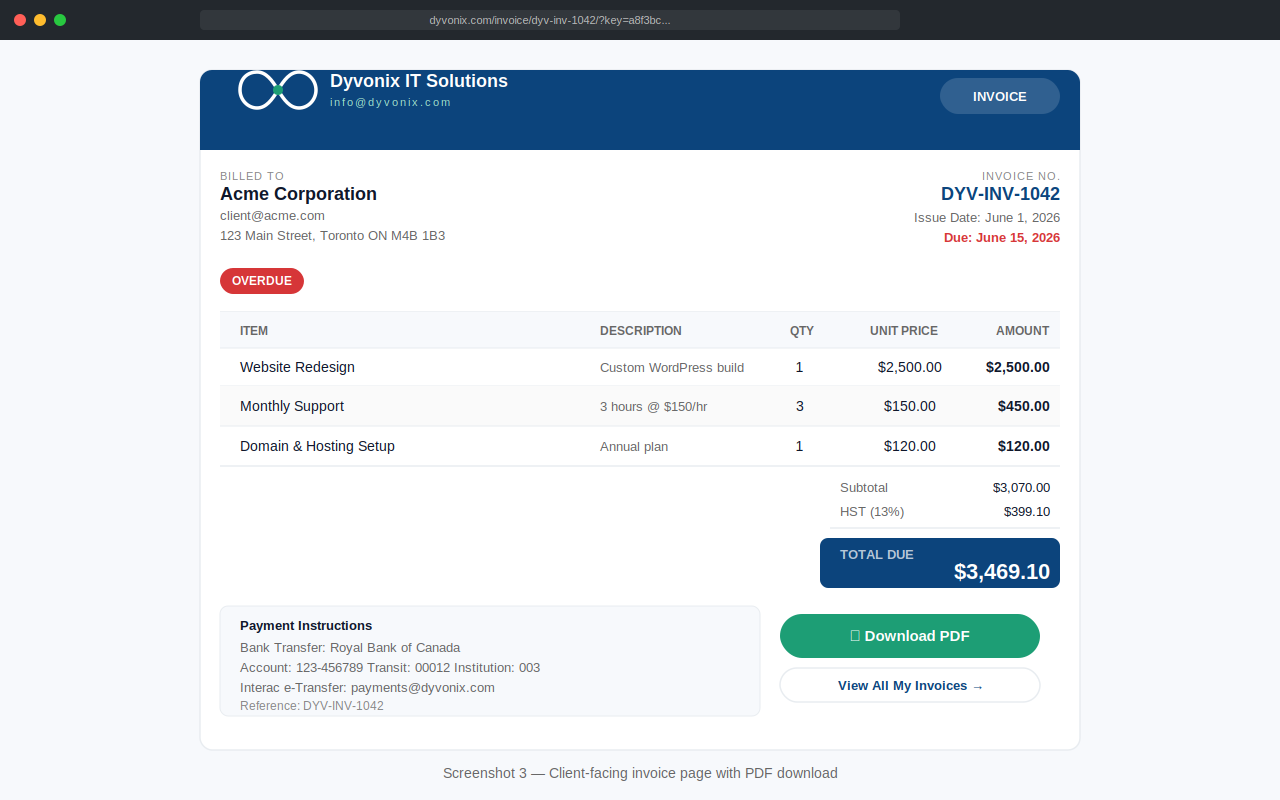
A WordPress invoicing plugin runs directly inside your existing WordPress website. You manage clients, create invoices, send quotes, and track payments from your WordPress admin — no separate platform needed.
WordPress invoicing plugins:
- Dyvonix Invoices: Free (Pro from $49 CAD one-time)
- WP Invoice: Free / paid
- Sliced Invoices: Free / paid
- GetPaid: Free / paid
The Real Cost Comparison
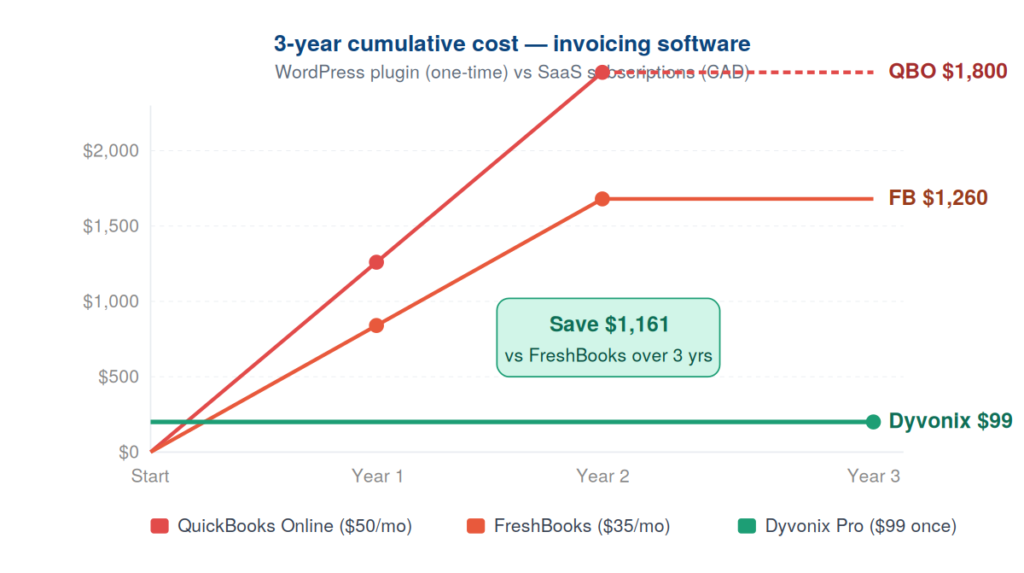
This is where the numbers get interesting.
SaaS over 3 years
FreshBooks Plus at $35/month CAD:
- Year 1: $420
- Year 2: $420
- Year 3: $420
- Total: $1,260 — and you own nothing. Cancel your subscription and you lose access to everything.
WordPress invoicing plugin over 3 years
Dyvonix Invoices Pro (Business — 3 sites) at $99 one-time:
- Year 1: $99
- Year 2: $0
- Year 3: $0
- Total: $99 — and you own it permanently.
Even renewing updates every year at $99, your 3-year cost is $297 — less than 24% of the cheapest SaaS option.
Feature Comparison
| Feature | SaaS (FreshBooks/QBO) | Dyvonix Invoices |
|---|---|---|
| Quotes | ✅ | ✅ |
| Invoices | ✅ | ✅ |
| Recurring billing | ✅ | ✅ |
| Partial payments | ✅ | ✅ |
| Client portal | ✅ | ✅ |
| PDF generation | ✅ | ✅ |
| Stripe payments | ✅ | ✅ Pro |
| Bank reconciliation | ✅ | ❌ |
| Expense tracking | ✅ | ❌ |
| Mobile app | ✅ | ❌ (mobile browser) |
| Your own domain | ❌ | ✅ |
| Data ownership | Vendor’s servers | Your server |
| Monthly fee | $17–$90/month | $0 (or one-time) |

Where SaaS Wins
You need accounting, not just invoicing
FreshBooks and QuickBooks Online are full accounting platforms — bank reconciliation, expense tracking, HST summaries, accountant integration. If you need these features, a WordPress invoicing plugin cannot replace them.
You want a mobile app
Most SaaS tools have polished iOS and Android apps. If you need to create invoices from your phone while on the road, SaaS wins here.
You do not have a WordPress site
If your business does not run on WordPress, a WordPress plugin is not an option.
You need multi-currency or international features
Established SaaS platforms handle multiple currencies and international tax rules better than most WordPress plugins.
Where WordPress Invoicing Wins
You already have a WordPress site
Everything in one admin — one login, one place to manage your site and your invoicing. Client invoice pages appear on your own domain: yourdomain.com/invoice/... instead of a FreshBooks URL.
You want to own your data

With SaaS tools, your client data lives on the vendor’s servers. If they are acquired, shut down, or change their pricing, your data is at risk. With a WordPress plugin, your data lives in your own database, under your control, subject to your own privacy policy.
You invoice but do not need full accounting
Many freelancers and small service businesses need to send invoices and collect payments — but not bank reconciliation or payroll. For these businesses, paying $35–$90/month for a full accounting platform means paying for features they never use.
You want predictable, one-time costs
A one-time purchase gives you a fixed cost that does not increase as you grow your client base or as the vendor raises prices.
Which Should You Choose?
Choose a SaaS tool if:
- You need full accounting — bank reconciliation, expense tracking, HST summaries
- You bill in multiple currencies
- You want a polished mobile app
- You do not have a WordPress site
Choose a WordPress invoicing plugin if:
- You already have a WordPress site
- You need invoicing but not full accounting
- You want to own your client data on your own server
- You want a one-time cost instead of a monthly subscription
- You care about brand consistency on client-facing documents
If you are currently paying $35+ per month for FreshBooks or a similar tool and only using the invoicing features, a WordPress invoicing plugin will save you significant money.
Getting Started
Dyvonix Invoices is free and includes quotes, invoices, recurring billing, partial payments, a client portal, and PDF generation — no subscription required.
The optional Pro upgrade adds custom brand colors and Stripe online payments, starting at $49 for a single site.
Questions about whether a WordPress invoicing plugin is right for your setup? Contact our team — we’re happy to give an honest recommendation.
