
Dyvonix Invoice
Management Plugin
Quotes, invoices, recurring billing, partial payments, and a secure client portal — all inside WordPress. Completely free. Upgrade to Pro for custom brand colors and online card payments.
A complete invoicing system,
built into WordPress
No monthly SaaS fees, no third-party dashboard. Everything lives in your WordPress admin.
Built for how you actually work
A clean WordPress admin, professional client-facing documents, and everything connected automatically.
Every invoice at a glance
Colour-coded status badges make it instant to see what's paid, overdue, or partially paid. Filter by status, search by client, and jump straight to any invoice.
- ✓Paid, Unpaid, Overdue, Partially Paid badges
- ✓Balance Due column — always know what's outstanding
- ✓🔁 icon flags recurring invoices at a glance

Create invoices in seconds
Add line items, set a tax rate, and the totals calculate live. Send directly from the editor — the activity log tracks every action automatically.
- ✓Live-calculating subtotal, tax, and total
- ✓Send Invoice button emails PDF automatically
- ✓Activity log — created, emailed, viewed, overdue

Professional. No login required.
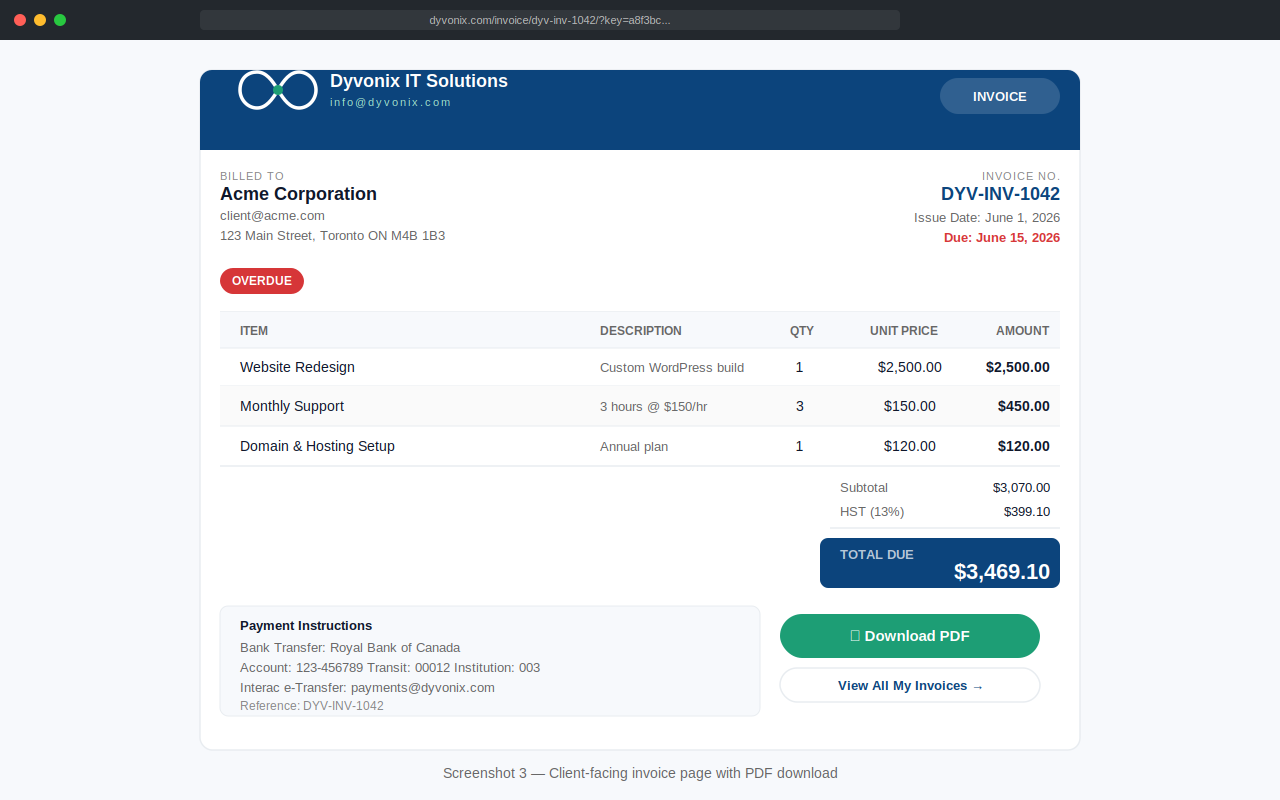
Your clients receive a secure link that opens their invoice instantly — no account, no password. Payment instructions, PDF download, and their full portal are all one click away.
- ✓Secure 32-character URL — not guessable
- ✓Bank transfer + Interac instructions shown
- ✓PDF download button on every invoice
Free forever. Upgrade when you're ready.
The free plugin is a complete, fully functional system — no expiry, no nag screens, no forced upgrades. Pro adds brand colors and online card payments.
- ✓Quotes with client Accept / Decline
- ✓Invoices with due dates & Overdue detection
- ✓Recurring billing (5 frequencies)
- ✓Partial payments — manual recording
- ✓Client portal — secure per-client dashboard
- ✓Bank transfer & Interac e-Transfer
- ✓PDF generation built in
- ✗Custom brand colors
- ✗Online card payments
- ✓Everything in Free
- ✓Custom brand colors
- ✓Stripe payments
- ✓License key emailed
- ✓1 site activation
- ✓1 year of updates
- ✓Email support
- ✓Everything in Free
- ✓Custom brand colors
- ✓Colors on invoices, quotes, portal & PDFs
- ✓Stripe payments — full or partial
- ✓Client chooses amount
- ✓License key emailed on purchase
- ✓3 site activations
- ✓1 year of updates & support
- ✓Everything in Business
- ✓Unlimited site activations
- ✓Deploy for all your clients
- ✓Priority support
- ✓1 year of updates
Complete feature breakdown
Every capability, organized by area. No hidden limits in the free version.
- ✓Line items — title, description, qty, unit price
- ✓Live-calculating subtotal, tax & total
- ✓Per-quote tax rate override
- ✓Sequential numbering with custom prefix
- ✓Configurable validity period
- ✓Secure no-login client view (random key)
- ✓Client can Accept or Decline
- ✓Accept auto-creates invoice and emails it
- ✓PDF download on admin and client view
- ✓Same line-item / tax system as quotes
- ✓Due dates with automatic Overdue detection
- ✓Partial + Overdue combined status
- ✓Bank transfer & Interac instructions shown
- ✓Manual payment recording — bank, Interac, cash, cheque
- ✓Full payment history on invoice & admin
- ✓Void Invoice action
- ✓Activity log — every status change & payment
- PROOnline card payments via Stripe
- ✓Weekly, every 2 weeks, monthly, quarterly, yearly
- ✓Daily background cron — fully automatic
- ✓Auto-emails each generated invoice
- ✓Stop after N invoices or a specific end date
- ✓Pause, resume, cancel from the admin
- ✓Generate Now for immediate / test runs
- ✓Admin notification when schedule completes
- ✓Record partial or full payments from admin
- ✓Partially Paid status (not just Paid / Unpaid)
- ✓Correct receipt email — full vs. partial
- ✓Remaining balance shown in receipt
- ✓Overpayment guard
- PROStripe online checkout — client chooses amount
- PROOptional minimum partial payment
- PROIdempotent — webhook + return never double-records
- ✓Secure per-client magic link — no login needed
- ✓Lists all invoices & quotes for that client
- ✓Total outstanding balance at a glance
- ✓Links to every document
- ✓Linked automatically from every email
- ✓32-character random key — not guessable
- PROPortal styled in your custom brand colors
- PROPick Primary, Accent & Dark colors via WP color picker
- PROApplied to invoice page, quote page, portal & PDF
- PROColor tints calculated automatically
- PROPDF header, totals & table header in brand color
- PRONo CSS editing — all settings-based
- ✓Free uses Dyvonix's Ocean Blue / Teal by default
FAQ
No. The free plugin is fully functional with no time limits and no persistent upgrade banners. A small dismissible notice appears at most once per week on plugin screens only — it disappears the moment you dismiss it.
Not at all. Stripe is a Pro-only feature for online card payments. The free version fully supports bank transfer, Interac e-Transfer, cash, cheque, or any offline payment method — you record payments manually in the WordPress admin.
After purchase you receive a license key by email. Paste it in Dyvonix Invoices → Settings → License and click Activate. The plugin verifies it against the Dyvonix license server and unlocks Pro features instantly. Keys are re-verified daily in the background, with a 5-day grace period if our server is temporarily unreachable.
Yes. Go to Settings → License → Deactivate on This Site. This frees the activation slot so you can activate the same key on a new domain. Business licenses cover 3 sites simultaneously; Agency licenses are unlimited.
Yes. The plugin renders its own standalone templates for the client-facing invoice, quote, and portal pages — completely bypassing your active theme. Your theme is only used in the WP admin where you manage documents.